Appearance
Settings Admin Guide
Audience: HR and system administrators · Area: Settings (gear icon in top navigation) · System: NKL-HR
This guide details what every section and item in Settings does, who can access it, and the recommended sequence for system configuration.
1. Before You Start
Access Settings by clicking the gear icon in the top navigation bar. The left navigation pane lists all settings sections; click any section to open its items.
- Search: The search bar at the top of the Settings page locates any configuration parameter by name (for example, "Badge ID Prefix" or "Use TLS") and opens it directly.
- Role-Based Visibility: What you see depends on your assigned permissions. Sections and items outside your privileges are automatically hidden. Module-specific settings only display when their corresponding module is active.
- Ministry / Company Scoping: Many settings apply per ministry. Always verify your current active entity in the company switcher before modifying configuration values.
2. Settings at a Glance
| Section | Configurable Items |
|---|---|
| General | System Preferences, Menu Access Restrictions, Roles and Permissions, Audit & History, Outlook Mail |
| Organization | Companies, Departments, Job Positions, Job Roles, Weekly Off Days |
| Email Servers, Email Templates, Email Automations | |
| Recruitment | Candidate Portal (Application Tracking, Rating Visibility) |
| Attendance | Attendance Rules (Check In/Out, At-Work Tracker, Late/Early Tracking, IP Login Restriction, Biometrics, Face Detection, Geofencing) |
| Leave | Leave Rules (Compensatory Leave, Restrict Past Date Leave) |
| Payroll | Encashment Settings (Leave Unit Amount, Bonus Unit) |
| Offboarding | Offboarding Rules (Allow Resignation Request, Default Notice Period) |
| Assets | Asset Rule (Enable Asset Fine) |
| E-Learning | Course Categories, Certificate Templates |
| Appearance | Color Theme |
| Integrations | Google Drive Backup, LinkedIn, LDAP, Google Meet, WhatsApp |
| Master Data | Import Data, Import History |
| Product Tours | Manage Tours (active when product tours are enabled) |
3. General
System Preferences
Navigation: Settings › General › System Preferences
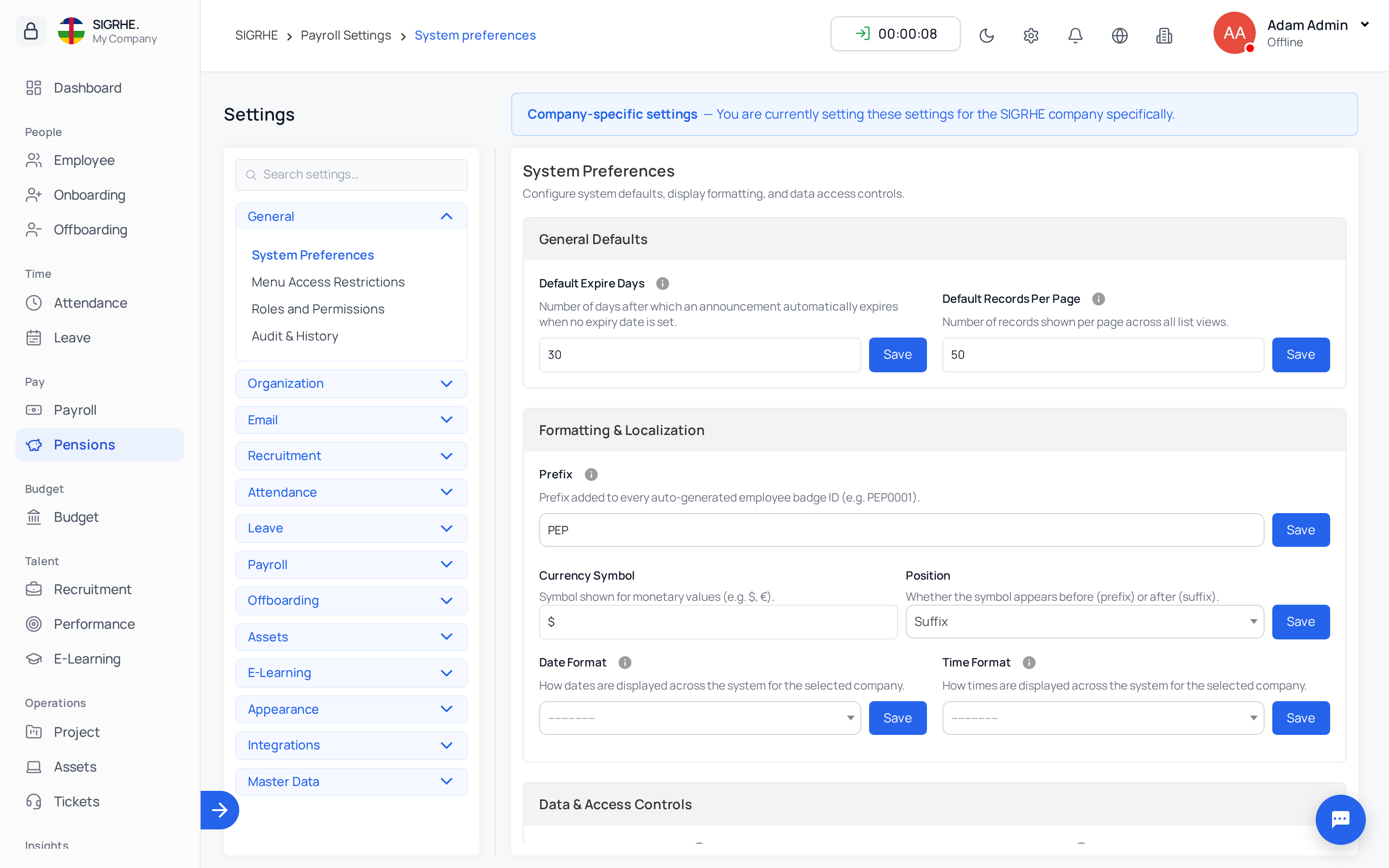
| Setting | Operational Effect |
|---|---|
| Default Expire Days | Number of days announcements remain active before expiring automatically, per ministry. |
| Default Records Per Page | Default number of table rows displayed per page across lists, per ministry. |
| Badge ID Prefix | Prefix applied to sequential employee badge IDs. With EMP, new personnel receive EMP0001, EMP0002… Up to 5 alphanumeric characters. |
| Currency Symbol | Currency symbol displayed across financial calculations (e.g., $, €, FCFA). |
| Currency Position | Determines whether the currency symbol appears before or after numerical values. |
| Date Format | System-wide date formatting standard (e.g., YYYY-MM-DD, DD/MM/YYYY). |
| Time Format | 12-hour or 24-hour time display. |
| Restrict Login Account | Enables administrators to block or unblock employee user logins directly from employee profiles. |
| Restrict Profile Edit | Prevents standard employees from modifying their own core profile details after onboarding. |
| Work Information Tracking | Audits and logs historical changes to employees' work information attributes inside their profile History tab. |
| Tracking Fields | Configures which specific work information fields are recorded in the history audit log. |
| Enable Languages | Selects which localized languages appear in the top navigation language switcher. |
Menu Access Restrictions
Navigation: Settings › General › Menu Access Restrictions
Controls which users or roles can access specific menus and dashboard widgets beyond standard permissions (e.g., permitting non-admin department leads to view the employee directory or the birthday widget).
Roles and Permissions
Navigation: Settings › General › Roles and Permissions (Superusers only)
| Item | Purpose |
|---|---|
| Roles | Standardized, reusable permission sets (e.g., HR Officer, Payroll Clerk, Leave Approver). Roles are assigned per ministry: permissions granted in one ministry do not grant rights in another. |
| Employee Permissions | Grants or revokes specific individual permissions for an employee. Best practice is to use Roles and reserve individual permissions for rare exceptions. |
Multi-Company Scoping Note: When All my companies is selected, a user possesses the combined permissions of their roles across each entity, but records are filtered strictly to authorized ministries.
Audit & History
Navigation: Settings › General › Audit & History
| Item | Purpose |
|---|---|
| Audit Tags | Labels for categorizing audit log events (e.g., Correction, Policy Update, Compliance Review). |
| Audit Tracking / Tracked Models | Specifies which database models and records are tracked by the audit log. |
Outlook Mail
Navigation: Settings › General › Outlook Mail
Connects a Microsoft 365 or Microsoft Outlook business mail account for sending system emails. When the Outlook add-on is configured, it replaces the generic Email Servers configuration.
4. Organization
Configures the core organizational structure. Each level depends on the previous entity, so configure them in the following order:
Companies ──► Departments ──► Job Positions ──► Job Roles
    ├──► Weekly Off Days
    └──► Public Holidays (managed from Leave › Public Holidays)
Data Integrity Rule: Master data records cannot be deleted once associated with active personnel or operational workflows. Rename or deactivate records rather than deleting them.
Companies (Ministries)
Navigation: Settings › Organization › Companies
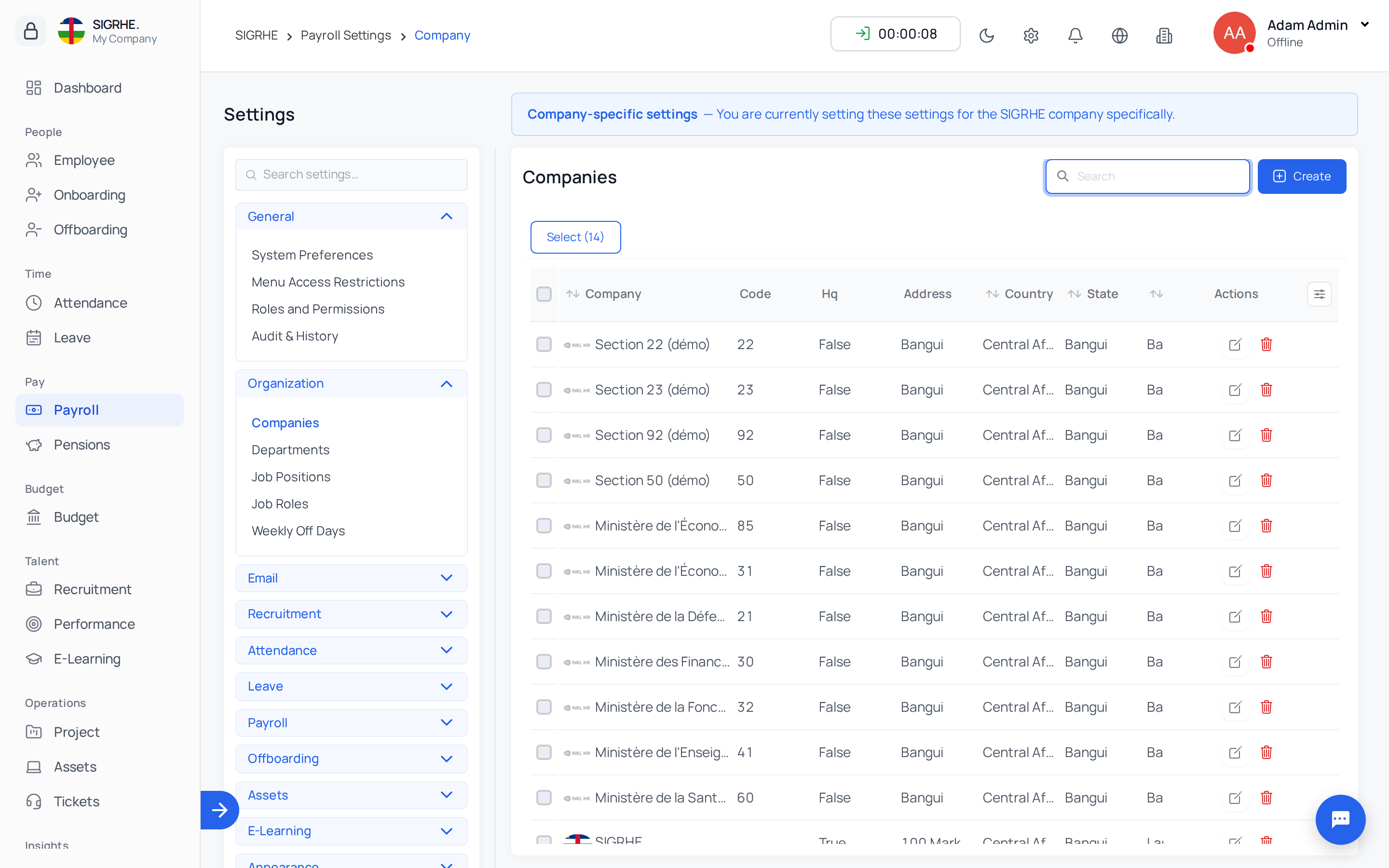
- Name: Official ministry or corporate entity name. The combination of name and address must be unique.
- Code: Administrative identifier or budget section code (e.g.,
30for Finance). - Address, Country, State, City, Zip: Postal and location details.
- Logo: Displayed in the company switcher, onboarding invitation emails, the onboarding portal, and e-learning completion certificates.
Departments
Navigation: Settings › Organization › Departments
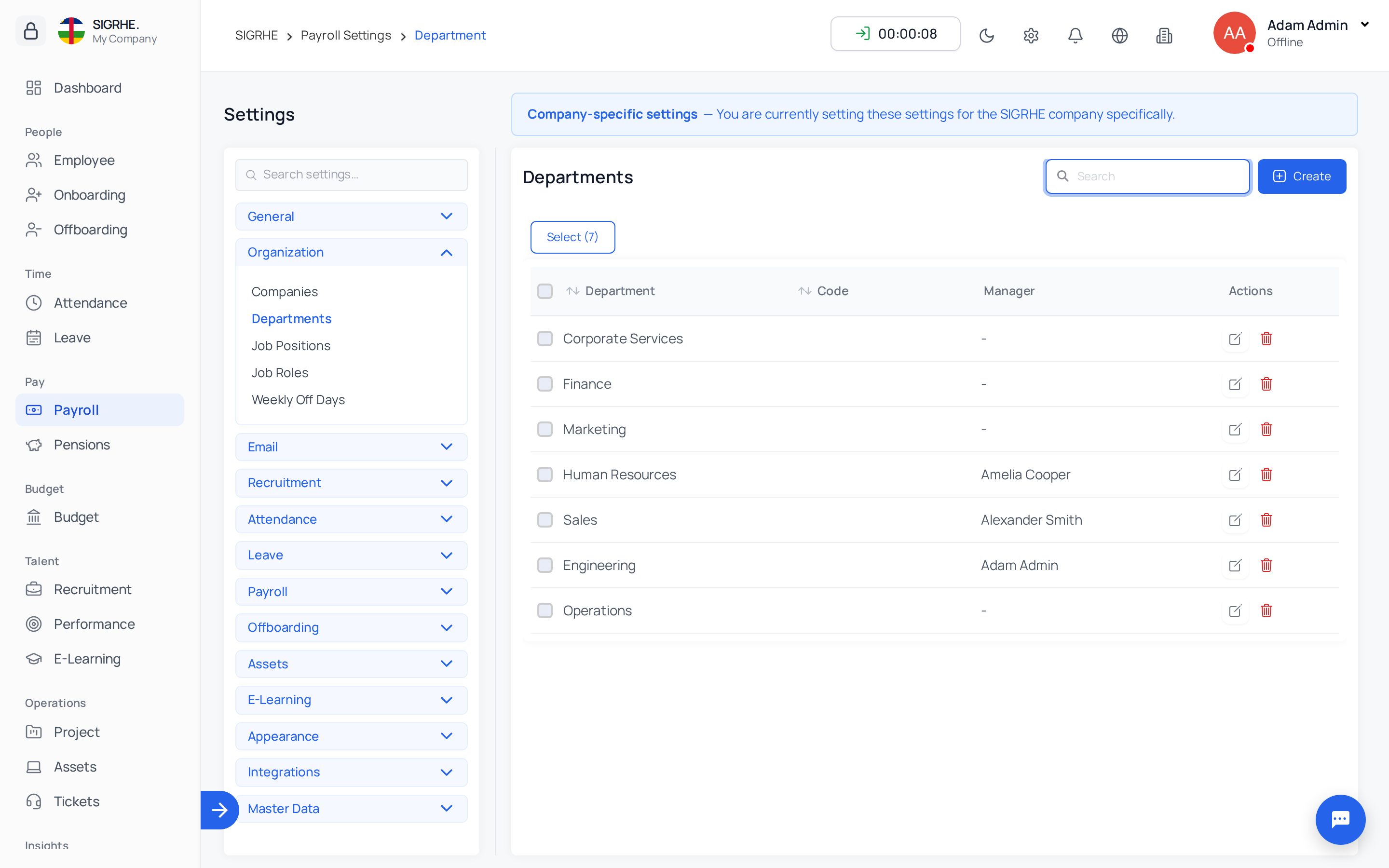
- Department: Name of the department. Must be unique within the ministry.
- Code: Cost-centre or administrative imputation code (e.g.,
120000). - Company: Assign to one or more ministries.
- Note: A department containing assigned job positions cannot be deleted.
Job Positions
Navigation: Settings › Organization › Job Positions
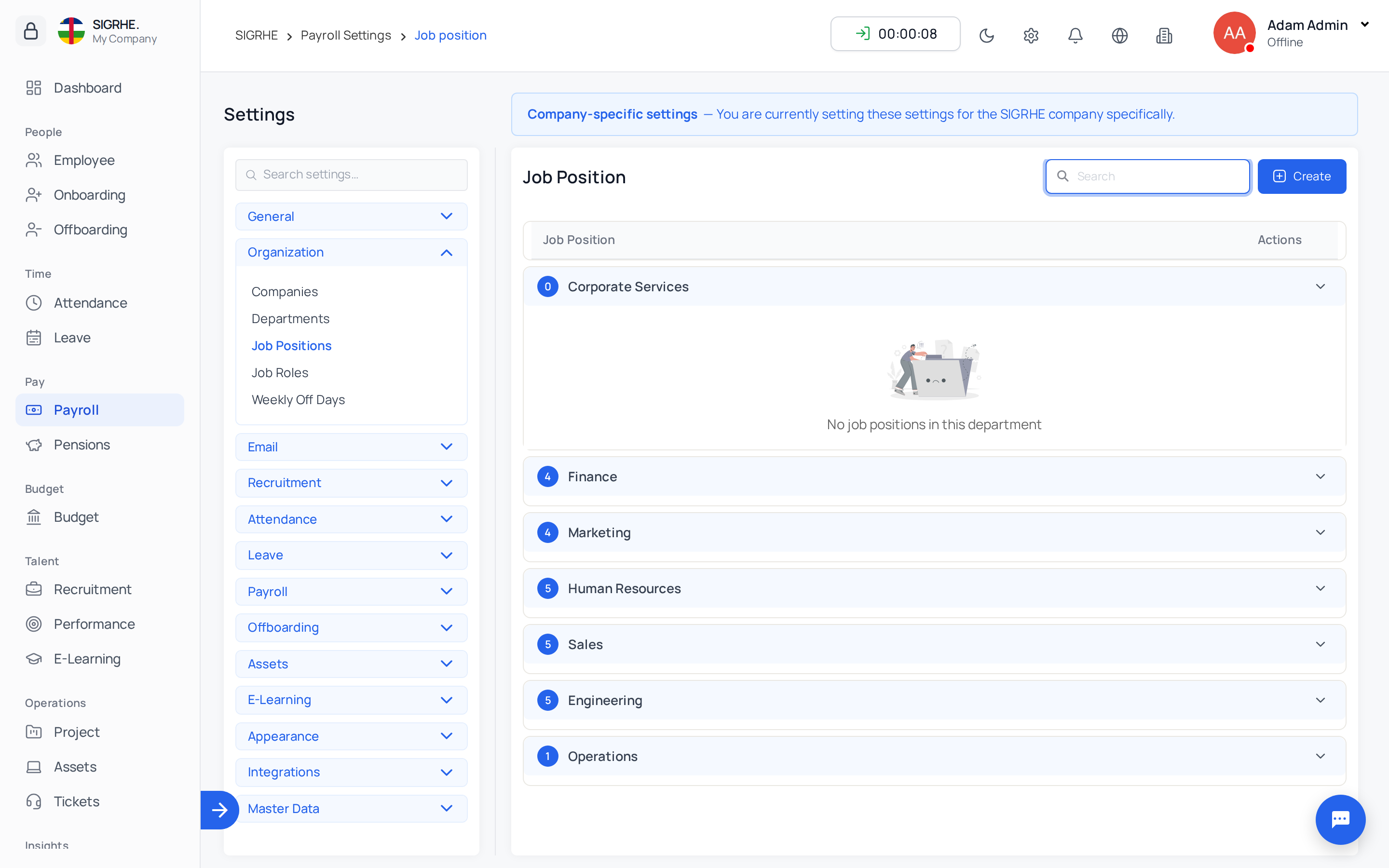
- Job Position: Title (e.g., Financial Analyst, Senior Systems Engineer).
- Department: Associated department (required).
- Company: Associated ministry or ministries.
- Headcount: Planned organizational capacity. Recruitment campaigns can only open vacancies up to the free capacity (
Headcount - Active Personnel - Open Vacancies). Set to0for unlimited capacity. - Note: A job position containing assigned job roles cannot be deleted.
Job Roles
Navigation: Settings › Organization › Job Roles
Specific functional specializations within a job position (e.g., Lead Tax Auditor within Auditor). Role titles must be unique within their job position.
Weekly Off Days
Navigation: Settings › Organization › Weekly Off Days
- Based On Week: Select First Week through Fifth Week of the month, or leave blank to apply to every week.
- Based On Week Day: Select day from Monday through Sunday.
- Company: Associated ministry or ministries.
- Configuration Example: For standard Saturday and Sunday rest days, add Saturday and Sunday with no week selected. For alternating weekend schedules (e.g., 2nd and 4th Saturday off), configure Saturday, Second Week and Saturday, Fourth Week.
Public Holidays
Important: Statutory public holidays are configured and managed under
Leave › Public Holidays, not in Settings. A holiday includes name, start and end dates, an optional yearly Recurring flag, and can be scoped to specific ministries, departments, positions, or the entire organization.
5. Email
Email Servers
Navigation: Settings › Email › Email Servers
Configures the outgoing SMTP mail server utilized for system communications (onboarding portal links, notification alerts, password resets, and bulk mailings). Hidden when Outlook Mail is active.
| Parameter | Description |
|---|---|
| Email Host & Port | SMTP server address and port (e.g., smtp.office365.com on port 587, or port 465). |
| Email Host Username & Password | Authenticated credentials for the outbound mail account. |
| Default From Email | Standard sender email address for outgoing messages. |
| Display Name | Sender name displayed to email recipients. |
| Use Dynamic Display Name | Dynamically substitutes the sender display name with the name of the user triggering the action. |
| Use TLS / Use SSL | Transport encryption protocol. Typically TLS for port 587 or SSL for port 465 (never enable both). |
| Email Send Timeout | Connection timeout in seconds. |
| Fail Silently | Suppresses user-facing error messages on delivery failure. Disable during setup to diagnose connectivity issues. |
| Primary Mail Server | Designates the default active server when multiple email profiles are configured. |
Email Templates
Navigation: Settings › Email › Email Templates
Reusable notification and letter layouts with dynamic placeholder tags (e.g., candidate name, job title, login URL). Utilized in bulk communications, onboarding email packs (rendered as downloadable PDFs), and automated triggers.
Email Automations
Navigation: Settings › Email › Email Automations
Triggers automated communications based on database record state transitions:
- Automation Title: Descriptive rule name.
- Trigger Condition: Executes On Create, On Update, or On Delete of designated record types, with optional conditional filters.
- Delivery Channel: Dispatches via Email, in-app Notification, or Both.
- Recipients & Template: Selects target recipients and the associated email template.
6. Recruitment
Candidate Portal
Navigation: Settings › Recruitment › Candidate Portal
- Application Tracking: Allows external applicants to track their progress through recruitment stages via a self-service portal.
- Rating Visibility: Determines whether interview scores and candidate ratings are exposed to applicants.
7. Attendance
Attendance Rules
Navigation: Settings › Attendance › Attendance Rules
| Rule | Operational Effect |
|---|---|
| Enable Check In / Check Out | Displays the clock-in/out interactive button across employee portals. |
| At-Work Tracker | Renders a live real-time elapsed workday counter inside the clock-in button. |
| Track Late Arrival & Early Departure | Automatically records tardiness and early departures against shift schedules. |
| IP Login Restriction | Restricts check-in capabilities strictly to whitelisted corporate IP addresses. |
| Biometric Attendance | Enables synchronization with on-premises biometric terminal hardware. |
| Face Detection | Requires facial recognition verification upon clock-in. |
| Geofencing | Restricts mobile attendance check-ins to authorized geographic coordinate radiuses. |
Note on Shift Policies: Shift grace periods, minimum working thresholds, and validation rules are configured under
Attendance › Time Policies.
8. Leave
Leave Rules
Navigation: Settings › Leave › Leave Rules
- Compensatory Leave: Enables compensatory leave request workflows when personnel work on scheduled rest days or public holidays. Requires the Attendance module.
- Restrict Past Date Leave: Enforces that standard employees cannot submit retroactive leave requests for past dates; backdated entries are restricted to authorized administrators.
Note on Leave Setup: Entitlement categories, carry-forward parameters, and multiple approval chains are managed under
Leave › Configuration.
9. Payroll
Encashment Settings
Navigation: Settings › Payroll › Encashment Settings
- Leave Unit Amount: Monetary rate paid out per unit of unused leave encashed.
- Bonus Unit: Monetary valuation paid out per redeemed performance bonus point.
10. Offboarding
Offboarding Rules
Navigation: Settings › Offboarding › Offboarding Rules
- Allow Resignation Request: Enables self-service resignation letter submissions by employees and reveals the Resignation Letters management queue.
- Default Notice Period: Fallback duration (in calendar days) between resignation submission and the final working date, applied when an approval has no explicit end date and the employee has no contract-defined notice period.
11. Assets
Asset Rule
Navigation: Settings › Assets › Asset Rule
- Enable Asset Fine: Empowers HR administrators to levy a financial fine or deduction when physical equipment is returned damaged or incomplete.
12. E-Learning
Navigation: Settings › E-Learning
- Course Categories: Taxonomical classification to group courses in the public training catalog. Deleting a category keeps its associated courses uncategorized without data loss.
- Certificate Templates: Configures visual designs (Classic, Modern, Elegant, Minimal), border accents, typography, and up to two executive signatories for verifiable graduation certificates. One template can be designated as the ministry default. Use Preview to review rendered formatting. Leaving Heading and Body Text blank prints standard localized wording in each reader's system language.
13. Appearance
Color Theme
Navigation: Settings › Appearance › Color Theme
Selects application-wide visual color palettes across user interfaces. Theme selections apply globally across the organization.
14. Integrations
Navigation: Settings › Integrations
| Integration | Functional Capability | Required Credentials |
|---|---|---|
| Google Drive Backup | Dispatches automated database snapshots and uploaded document backups to Google Drive. | Google Cloud OAuth client credentials JSON and Google Drive Folder ID |
| Directly distributes published job vacancies to LinkedIn. | LinkedIn API Developer Token | |
| LDAP | Enables single sign-on (SSO) and central directory account authentication. | LDAP Server URI (e.g., ldap://127.0.0.1:389), Bind DN, and Base DN |
| Google Meet | Automatically generates Google Meet video conference links for candidate interview schedules. | Google Cloud Project ID, OAuth Client ID & Secret, Authorized Redirect URIs |
| Dispatches transactional notices and alerts via WhatsApp Business API. | Meta Developer Token, Business Account ID, Phone Number ID, Webhook Token |
Security Note: Each integration includes an Enable toggle switch. Keep credentials confidential; users with access to these screens can view and update connection secrets.
15. Master Data
Import Data
Navigation: Settings › Master Data › Import Data
Provides high-throughput spreadsheet ingestion with pre-validation, real-time error detection, and interactive on-screen correction before database commit.
| Supported Data Entity | Ingested Data Contents | Supports Updating Existing Records |
|---|---|---|
| Employees | Personal information, work attributes, contracts, and banking details | Yes |
| Leave Balances | Initial leave balance allocations per employee and leave type | Yes |
| Assets | Hardware asset inventory: category, batch, purchase cost, and warranty dates | Yes |
| Asset Allocation | Physical asset custody assignments to active personnel | Yes |
| Candidates | External applicant records for open recruitments | No |
4-Step Ingestion Lifecycle
- Upload:
- Select target entity and download the official column template.
- Choose ingestion mode:
- Create: Ingests new records and ignores existing matches.
- Update: Updates existing records matching designated keys.
- Both: Modifies existing records and inserts new entries.
- Upload
.csv,.xlsx, or.xlsfile (up to 10 MB).
- Map Columns:
- Automatically pairs spreadsheet header columns to system database fields (e.g., Staff ID to Badge ID). Review and adjust header pairings as necessary.
- Review & Correct:
- Rows containing validation discrepancies are listed alongside specific error reasons. Correct discrepancies directly on screen, or choose to skip invalid rows.
- Displays an entity creation preview detailing any new companies, departments, or positions that the import will provision.
- Option to download filtered spreadsheets of valid, error, or skipped rows.
- Import:
- Displays real-time progress. A completion summary confirms imported, unchanged, skipped, and failed record counts.
- Discrepant rows are omitted from database ingestion; download the generated Error File, correct entries, and re-import. Ingestion is transactional: if a critical system crash occurs during processing, uncommitted batches roll back cleanly.
Updating Record Rules
- Select the unique identifier field used to locate existing records (for employees: Badge ID, Email, or Phone).
- Blank Cell Preservation: Blank spreadsheet cells leave existing database values untouched; only filled cells update records.
- The matching identifier field itself cannot be changed via update import.
Employee Spreadsheet Columns Reference
| Data Category | Column Headers (Bold = Required) |
|---|---|
| Personal | Badge ID, First Name, Last Name, Full Name, Email, Phone, Gender (Male, Female, Other), Address |
| Login | Username, Password (If omitted, Email becomes username and a secure password is generated automatically) |
| Work | Company, Department, Job Position, Job Role, Work Type, Shift, Employee Type, Reporting Manager, Location, Date Joining, Contract End Date |
| Compensation | Basic Salary, Salary Hour, CTC, Salary Structure |
| Banking | Bank Name, Account Number, Bank Branch, Bank Code 1 (IFSC, SWIFT, Routing), Bank Code 2, Bank Country, Bank State, Bank City, Bank Address |
Date format requirement: YYYY-MM-DD. Password values are never exported in download files, and uploaded source spreadsheets are purged immediately upon processing completion.
Import History
Navigation: Settings › Master Data › Import History
Displays an audit log of the last 100 import operations detailing filename, data entity, executing administrator, timestamp, and final status:
- Uploaded / Mapped: Ingestion process paused or incomplete; click to resume column mapping.
- Imported: Completed successfully. Download the error file if partial rows were skipped.
- Failed: Import terminated with error; no database changes were committed.
16. Product Tours
Navigation: Settings › Product Tours › Manage Tours
Enables administrators to create structured, step-by-step interactive walkthroughs for end-users across different screens. Tours can be configured to launch automatically when an employee accesses a view for the first time. Visible only when product tours are activated for the deployment.
17. Recommended Setup Order
When configuring a new deployment or onboarding a new ministry, execute setup in this sequence:
- Organization Master Data (
Settings › Organization): Create Companies (Ministries), Departments, Job Positions, Job Roles, and Weekly Off Days. - Public Holidays (
Leave › Public Holidays): Configure statutory holidays and annual recurring non-working days. - General System Preferences (
Settings › General › System Preferences): Set Badge ID Prefix, currency conventions, date/time standards, and enabled languages. - Email Configuration (
Settings › Email › Email ServersorOutlook Mail): Establish mail server connection and dispatch a test communication (e.g., password reset). - Roles & Permissions (
Settings › General › Roles and Permissions): Configure standardized security roles and assign administrative personnel per ministry. - Module Governance Rules: Establish Attendance Rules, Leave Rules, Offboarding Rules, Encashment Settings, Asset Rule, and Candidate Portal preferences.
- Master Data Import (
Settings › Master Data › Import Data): Bulk import employee directories, followed by initial leave balances, physical asset registries, and candidate pools. - E-Learning Setup (
Settings › E-Learning): Define course categories and establish the default completion certificate template.
18. Who Can Do What: Permission Matrix
| Settings Item | Required Access Permission |
|---|---|
| System Preferences | View Company, Change Employee General Setting, or View History Tracking Fields |
| Menu Access Restrictions | View Permission |
| Roles and Permissions | Superusers only |
| Audit & History | View Audit Tag or View Audit Model Config |
| Outlook Mail | View Dynamic Email Configuration (when Outlook add-on is active) |
| Companies / Departments / Positions / Roles | View Company / View Department / View Job Position / View Job Role |
| Weekly Off Days | View Company Leaves |
| Email Servers | View Dynamic Email Configuration (when Outlook add-on is inactive) |
| Email Templates | View Mail Template |
| Email Automations | View Mail Automation |
| Candidate Portal | View Recruitment |
| Attendance Rules | Permissions for attendance, biometric, geofencing, or face detection settings |
| Leave Rules | Add Restrict Leave or View Attendance Validation Condition |
| Encashment Settings | Change Encashment General Settings |
| Offboarding Rules | Change Offboarding General Setting or Change Payroll General Setting |
| Asset Rule | View Asset General Setting / Change Asset General Setting |
| Course Categories / Certificate Templates | View Course Category / View Certificate Template |
| Color Theme | View Color Theme |
| Integrations (Drive, LinkedIn, LDAP, Meet, WhatsApp) | Designated integration permissions per service |
| Import Data / Import History | Superuser, or Add Employee, Add Available Leave, Add Asset, Add Asset Assignment |
| Manage Tours | View Tour (when product tours are active) |
19. System Administrator CLI Operations
These maintenance and setup tasks are executed via the server command line by technical administrators:
| Command | Operational Purpose |
|---|---|
python manage.py migrate | Applies all database schema migrations across modules. |
python manage.py compilemessages | Compiles language translation catalogs. |
python manage.py seed_pension_pack car | Loads statutory Central African Republic (CAR) pension regulatory tables without overwriting custom modifications. |
python manage.py import_pension_data <kind> <file> [--commit] [--skip-errors] | Command-line execution of pension data migration batches for members, service periods, contributions, and beneficiaries. |
python manage.py elearning_resync_progress | Recalculates learner progress percentages across active enrolments. |
python manage.py seed_elearning_demo | Provisions sample e-learning demonstration courses, categories, and quizzes (--reset to rebuild or --remove to purge). |