Appearance
Pension Management
The Pension Management module in NKL-HR provides end-to-end administration of pension contributions, statutory fund declarations, retirement forecasting, pension claim processing, pensioner registers, life certificate verifications, and monthly pension disbursements.
1. Module Overview & Statutory Architecture
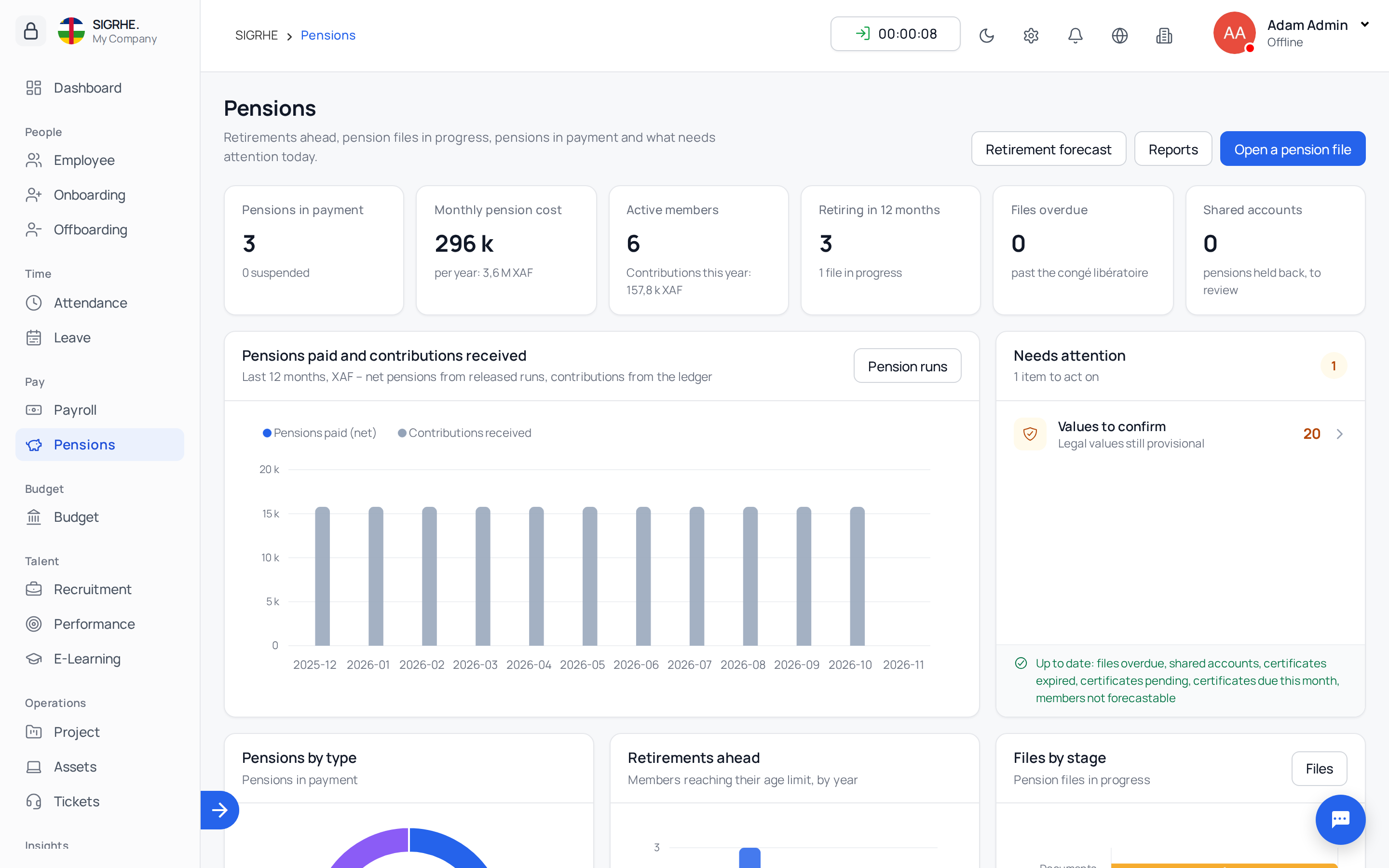
The Pension module is delivered with configurable multi-fund architecture (including starting packs for statutory funds like CNSS and CCPCM).
- Fully Parameterized: Statutory deduction rates, age limits, service thresholds, annuity rates, survivor benefit shares, checklists, and file layouts are managed as dated configuration data.
- Dated Validity: Every statutory rate or parameter row features a validity period (
Valid From/Valid To), preserving historical fidelity across legislative reforms.
2. Configuration of Funds & Rules
Navigation: Pensions → Configuration
| Component | Functionality |
|---|---|
| Funds | Configure managing entities (code, name, fund type, currency, declaration frequency, retirement alert offsets). |
| Fund Branches | Old-age pension, family allowances, work-accident coverage; linked to specific payroll deduction types. |
| Regimes | Maps employee types to funds (e.g., civil servants to CCPCM, contract personnel to CNSS). |
| Categories | Classification tiers (e.g., A1 through D2, higher education faculty). |
| Parameters | Dated formula parameters with legal references (AGE_LIMIT, MIN_SERVICE_YEARS, ANNUITY_RATE, MAX_RATE, SPOUSE_SHARE, ORPHAN_AGE, LIFE_CERT_GRACE_DAYS). |
| Claim Types | Retirement, early retirement, disability, survivor pension, lump-sum refund. |
| Document Checklists | Mandatory and conditional document requirements per claim type. |
| Approval Stages | Sequential multi-tier approval chains with role segregation (e.g., liquidator, financial controller, director). |
| Benefit Rules | Dated benefit calculation formulas per claim type, including reference salary criteria, minimums, and caps. |
| File Formats | Dynamic layouts for statutory fund declarations and bank payment files (CSV, XML, Fixed-Width, Excel). |
| Document Templates | Print templates for retirement decrees, liquidation statements, and official pension books. |
3. Contribution Rates & Salary Bases
Navigation: Pensions → Configuration → Parameters / Contribution Rates
Percentage deduction lines support dated rate rows:
- Valid From Date: Activation date for statutory rate changes.
- Employee & Employer Rates: Calculated on the designated salary base.
- Floors & Ceilings: Enforces minimum contributions and maximum salary caps (e.g., CNSS 600,000 XAF ceiling).
- Legal Reference & Status: References statutory legislation, flagged as Confirmed or To Confirm.
4. Fund Memberships & Service Records
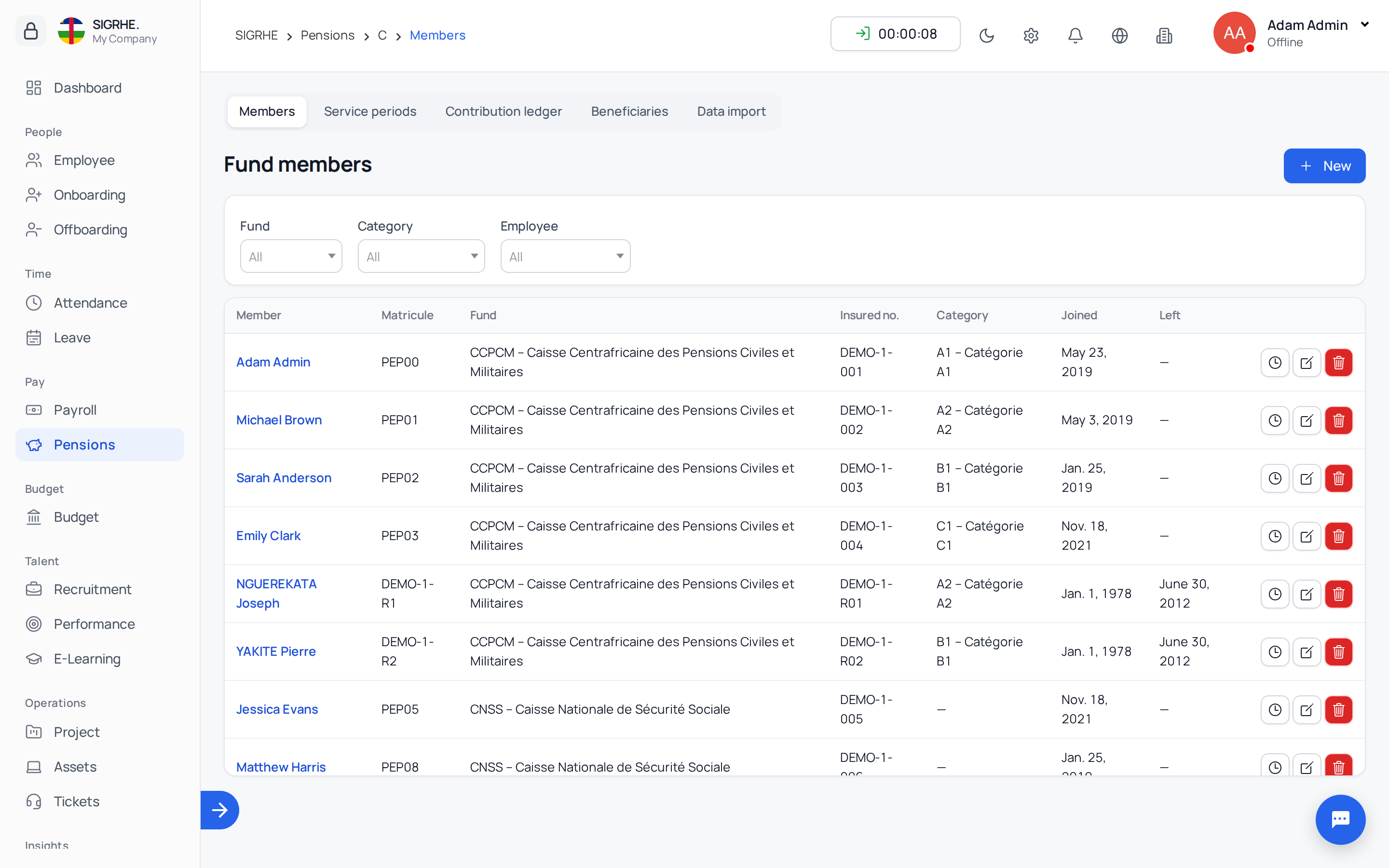
Every eligible employee is registered under a Fund Membership:
- Membership Information: Fund, regime, national insured number, category, registration date, and beneficiaries.
- Contribution Posting: Member contributions post automatically when monthly payroll runs are confirmed or paid. Reversals or adjustments in payroll synchronize with the contribution ledger.
- Service Records: Tracks active contracts, secondments, unpaid leaves, military service, and contract gaps. Time intervals are calculated in years, months, and days (using standard 30/360 day-count conventions).
- Member Ledger: Printable annual contribution statement, missing month detection, and verified service summaries.
5. Statutory Fund Declarations
Navigation: Pensions → Declarations
Periodic statutory reporting for pension fund authorities:
- Create Declaration: Select fund, ministry/company, and reporting period (monthly or quarterly). Data aggregates automatically from issued payslips.
- Reconciliation: Review contribution breakdowns by branch and inspect warnings regarding missing insured numbers or unlinked contributions.
- Generate File: Compiles the export file adhering strictly to the fund's configured layout specification (Generated status).
- Filing Confirmation: Record the official submission receipt reference upon filing with the fund (Filed status). Filed declarations lock permanently against modification.
6. Retirement Forecasting
Navigation: Pensions → Retirement Forecast
Calculates projected retirement dates based on employee date of birth and statutory age limits for their category:
- Horizon Filtering: Filter retirement forecasts by horizon windows (12, 24, 36, or 60 months).
- Automated Notifications: Dispatches automated in-app notifications to HR and employees at configured offsets (e.g., 12, 6, and 3 months prior to retirement).
- One-Click Initiation: Direct link to launch a formal retirement pension file directly from forecast rows.
7. Pension File Processing & Claim Lifecycle
Navigation: Pensions → Pension Files
Manages formal claim applications across sequential workflow gates:
- File Initiation: Generate a sequential file number (e.g.,
PEN-2026-00001) based on claim type (Retirement, Early Retirement, Disability, Survivor, Lump Sum). - Documents Tab: Upload and verify checklist documents. All required items must be marked Received to unlock subsequent stages.
- Service Record Tab: Review verified service periods and document any contractual gaps.
- Calculation Tab: Execute formula liquidation. The system applies the statutory rule in effect on the event date. Each calculation run creates an immutable version snapshot with inputs, parameters, and resulting figures.
- System Validations: Automated verification of eligibility, contribution months, service duration, minimum floors, and maximum caps.
- Approvals Tab: Routes through configured approval tiers. Role segregation enforces that the calculation preparer cannot approve the calculation.
- Award & Liquidation: Upon final sign-off, the file closes as Awarded, creating the pensioner record and generating the Liquidation Statement (RPT-PEN02), official Retirement Decree, and Pension Book.
8. Survivor Claims & Beneficiary Allocations
- Beneficiary Registration: Record qualifying beneficiaries (spouses, dependent children, disabled dependents) with civil status certificates.
- Survivor Liquidation: Event date is set to the date of death. If the deceased was an active pensioner, survivor calculations derive from their active pension base.
- Share Allocations:
- Multiple spouses share the statutory spouse allocation equally.
- Dependent orphans receive individual shares up to statutory age limits (disabled children are exempt from age ceilings).
- System scales shares proportionally if total claims exceed 100%.
- On award, distinct pensioner accounts are created for each beneficiary, and the deceased member's pension terminates.
9. Pensioner Registry & Life Certificates
Navigation: Pensions → Pensioners
The registry tracks all active pensioners, pension types, awarded amounts, arrears, payment modes (Bank Transfer, Mobile Money, Cash), and active statuses (Active, Suspended, Terminated).
Life Certificate Campaigns
Navigation: Pensions → Life Certificates
- Launch periodic proof-of-life campaigns with defined deadline dates.
- Record received certificates via biometric confirmation, mobile verification, or physical documentation.
- Following the grace period, pensioners lacking verified certificates are automatically suspended from monthly payment runs. Verification immediately reinstates the pension.
Shared Bank Account Detection
Navigation: Pensions → Pensioners → Shared Accounts
- Automated fraud-prevention audit flagging multiple pensioners sharing identical bank account numbers or mobile wallets.
- Conflicting accounts are excluded from monthly payment runs until an administrative exception is formally investigated and approved.
10. Monthly Pension Payment Runs & Revaluations
Statutory Revaluations
Administer statutory pension adjustments by recording decree percentages and effective dates. Backdated revaluations calculate and accrue payment arrears automatically.
Monthly Pension Run
Navigation: Pensions → Pension Run
- Initiate a payment run for the fund, ministry, and target month.
- The engine computes payments for active, verified pensioners, proration for partial months, accrued arrears, and statutory deductions.
- Review audit journals and resolve excluded or conflicting records.
- Click Release to freeze calculations, settle arrears, and output banking disbursement files.
- Generate individual Pension Slips (RPT-PEN06) with verification QR codes.
11. Data Migration & Historical Import
Navigation: Pensions → Data Migration
Stepwise historical data onboarding:
- Execute imports in strict sequence:
1. Members2. Service Periods3. Contribution History4. Beneficiaries5. Active Pensions in Payment
- Validation First: Performs a comprehensive trial validation run, reporting row-level format or data errors without committing database changes.
- Commit imports once validation checks pass cleanly.
12. Security & Audit Logging
- Email 2FA One-Time Codes: High-privilege pension roles (Liquidator, Financial Controller, Director of Pensions, Pension Payroll Officer) require a 6-digit one-time code emailed upon session initiation.
- Tamper-Resistant Audit Trail (RPT-PEN09): Every modification to parameters, benefit rules, calculations, approvals, and pension records is logged with immutable timestamps, user IDs, and changed values.
13. Reports Reference
Navigation: Pensions → Reports
All reports can be exported to PDF, Excel, and CSV:
| Code | Report Title | Description |
|---|---|---|
| RPT-PEN01 | Retirement Forecast | Projected retirements by horizon and category. |
| RPT-PEN02 | Liquidation Statement | Detailed breakdown of calculated pension entitlements. |
| RPT-PEN03 | Pension Payroll Journal | Monthly reconciliation of net disbursements. |
| RPT-PEN04 | Contribution Statement | Historical service and contribution ledger per member. |
| RPT-PEN05 | Life Certificate Status | Compliance tracking across active campaigns. |
| RPT-PEN06 | Pension Slip | Individual monthly payment slip with security QR code. |
| RPT-PEN07 | Survivor Pension Register | Summary of active survivor and orphan pensions. |
| RPT-PEN08 | Cost Projection | Multi-year budgetary expenditure forecasts. |
| RPT-PEN09 | Audit Trail | Complete historical audit log of system modifications. |