Appearance
Offboarding
The Offboarding module in NKL-HR governs employee departures, formal resignation approvals, exit stage pipelines, departmental handover task checklists, and automated user account archival.
1. Prerequisites & Setup Order
Before managing employee offboarding:
- Determine whether employees can initiate self-service resignation requests under
Settings › Offboarding › Offboarding Rules. - Configure the Default Notice Period (days between resignation and last working day, used when an approval has no end date and the employee has no active contract notice period).
- Configure at least one operational Exit Process defining departure stages and checklists.
2. Process Workflow & Menu Overview
- Initiation: An employee submits a resignation letter via self-service, or HR directly adds an employee to an exit process (e.g., contract completion or dismissal).
- Approval & Pipeline Entry: Approving the resignation places the employee into the first stage of an exit process, establishing formal notice period boundaries.
- Task Completion: Departmental managers (IT, Finance, Operations) execute assigned handover and clearance tasks.
- Archival: Moving the leaver to the final Archived stage automatically deactivates their system login, blocks API/mobile access, and archives their employee profile.
| Menu | Purpose |
|---|---|
| Dashboard | Visual analytics tracking departing personnel across exit processes and stages, pending task counts, and assets pending return. |
| Resignation Letters | Review queue for employee resignation applications and withdrawal requests. |
| Exit Process | Multi-stage pipeline interfaces organizing leavers and tracking checklist completion. |
3. Managing Resignation Letters
Navigation: Offboarding → Resignation Letters
| Status | Meaning |
|---|---|
| Requested | Pending administrative or managerial review. |
| Approved | Resignation confirmed; employee is enrolled into the selected exit process. |
| Rejected | Application denied with mandatory justification notes. Cannot be reopened. |
| Cancellation Requested | Employee requested to withdraw an approved resignation application. |
| Cancelled | Resignation withdrawn and nullified. |
An employee may maintain only one active letter record (Requested, Approved, or Cancellation Requested) at any time.
Approving a Resignation
- Open the resignation letter and click Approve.
- Select the designated Exit Process (e.g., Standard Resignation, Executive Departure).
- Verify or adjust the Notice Period Start and Notice Period End dates. If left blank, the end date is derived automatically from the employee's active contract or system default notice duration.
- Confirm approval. The employee is placed into the first exit stage and notified.
Handling Cancellations
- Employees may immediately cancel a resignation that is still in Requested status.
- If a resignation is already Approved, the employee must submit a formal cancellation request (Cancellation Requested).
- HR reviews the cancellation request. Approval removes the employee from the exit process and restores standard active employment.
4. Configuring Exit Processes & Stages
Navigation: Offboarding → Exit Process → + Create
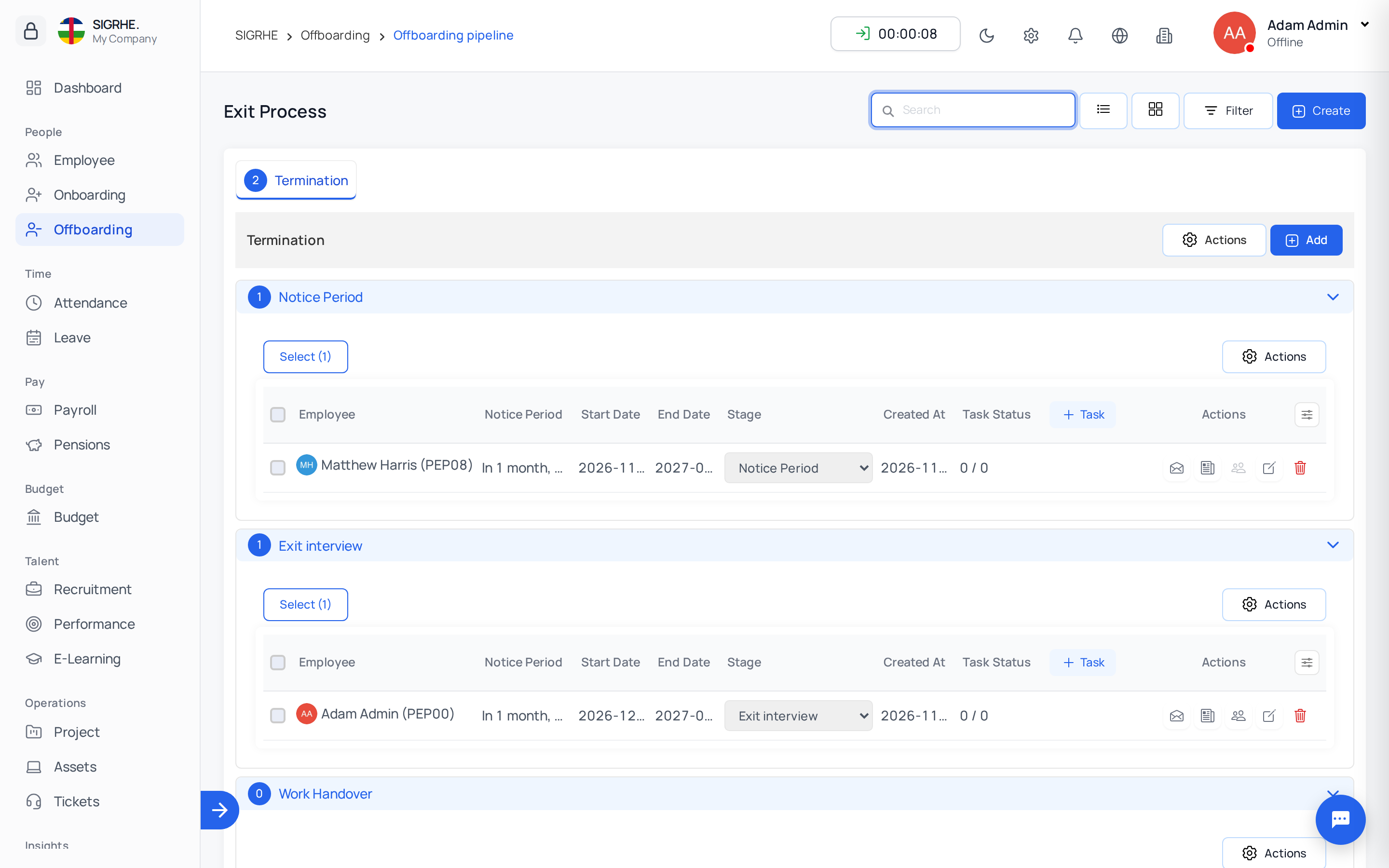
- Provide a process title (e.g., Standard Exit Process, Contract End Transition), description, and process managers.
- Saving creates the standard default stages automatically:
- Notice Period (Type: Notice period)
- Exit Interview (Type: Interview)
- Work Handover (Type: Work handover)
- FNF (Type: FnF Settlement / Full and Final Settlement)
- Farewell (Type: Other)
- Archived (Type: Archived)
- Customize stages and order to reflect organizational requirements.
Stage Properties & Types
- Title: Name of the exit phase.
- Type: Categorizes the operational nature of the stage. Supported types: Notice period, FnF Settlement, Interview, Work handover, Other, and Archived.
- Stage Managers: Staff authorized to oversee and advance leavers in this stage.
Critical Rule: Every exit process must retain exactly one stage of type Archived positioned as the final stage.
5. Exit Tasks & Checklists
Navigation: Offboarding → Exit Process → (Select Process Tab)
- Create Tasks: Click + Task on any stage header. Specify Title, assign Task Managers (e.g., IT Support for asset recovery, Payroll for settlement calculations), and configure the Required flag.
- Task Statuses: Track execution using: Todo, In progress, Stuck, and Completed.
- Stage Progression Lock: If an employee has incomplete Required tasks in their current stage, attempting to advance them to the next stage is blocked until all required items are marked Completed.
6. Enrolling Leavers Directly into an Exit Process
Employees departing due to contract expiration, mutual agreement, or administrative dismissal can be enrolled directly without submitting a resignation letter.
Navigation: Offboarding → Exit Process → (Select Process Tab) → Add Employee
- Select the target employee.
- Define the notice period start and end dates.
- Save. The employee is placed into the initial stage of the exit process.
Leaver Row Actions
Each row provides quick operational management tools:
- Send Mail: Dispatch formal departure notifications or clearance instructions.
- Notes: Record confidential offboarding notes with file attachments tied to the active stage.
- Managing Records: Displays critical responsibilities held by the employee (e.g., reportees, approval stages) to facilitate orderly reassignment.
- Edit: Adjust notice period dates or stage allocations.
- Archive / Un-Archive: Trigger immediate profile archival or restoration.
7. Archiving Leavers & Credential Deactivation
Advancing an employee into a stage of type Archived triggers automated offboarding finalization:
- The employee's master record is marked as archived.
- User account credentials, API access, and mobile application access are revoked immediately.
- If an archived employee is moved back to an earlier stage, their user account and active employment status are restored automatically.
Dependency Checks: If the departing employee is still referenced as an active reporting manager, stage manager, or approval authority, those roles must be reassigned prior to final archival. Use the Managing Records utility to reassign active responsibilities.
8. Offboarding Rules & System Settings
Navigation: Settings › Offboarding › Offboarding Rules
| Setting | Effect |
|---|---|
| Allow Resignation Request | Enables self-service resignation submission for employees and exposes the Resignation Letters management queue. |
| Default Notice Period | Days between resignation and last working day, used when an approval has no end date and the employee has no active contract notice period. |