Appearance
Employee Management
The Employee Management module in NKL-HR provides end-to-end administration of employee records, work information, schedules, employee requests, company policies, and disciplinary workflows.
1. Menu Overview
| Menu | Purpose |
|---|---|
| Dashboard | Headcount charts, new joiners, expiring documents, and pending request counts. Unassigned employees appear under Unassigned to help identify incomplete records. |
| Employees | The central directory: create, edit, import, export, filter, archive, or delete employee profiles. |
| Organization Chart | Visual hierarchy and reporting lines, dynamically generated from each employee's Reporting Manager. |
| Requests | Manage employee submissions for shift adjustments, work type changes, and uploaded compliance documents. |
| Work Schedules | Rotating shifts, rotating work types, and the comprehensive shift roster. |
| Policies & Discipline | Company policy publication, FAQs, disciplinary actions, and deduction penalties. |
| Configuration | Master definitions for shifts, shift schedules, work types, employee types, and employee tags. |
2. Employee Directory & Search
Navigation: Employee → Employees
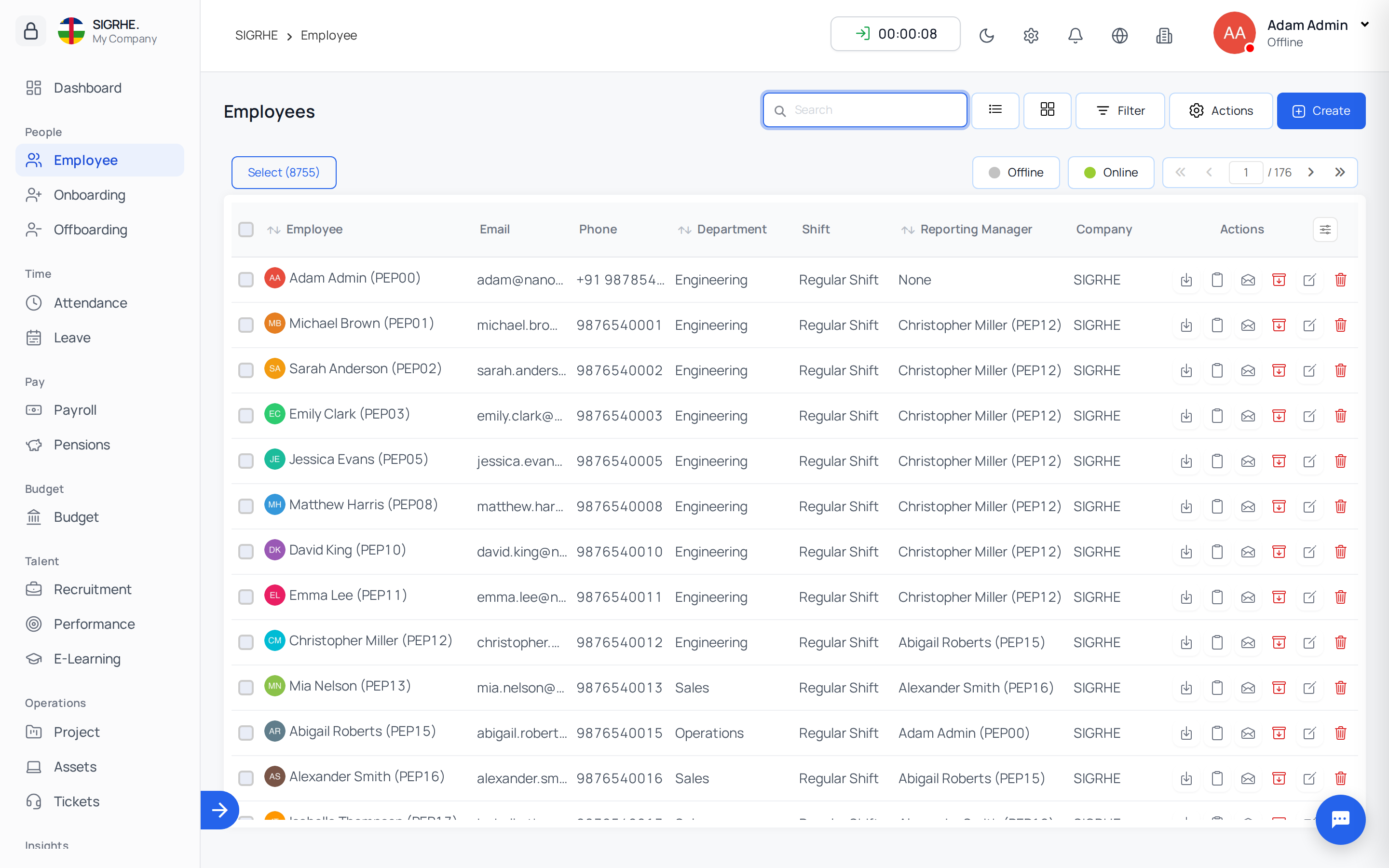
The directory offers two presentation modes: List View and Card View (toggle via icons adjacent to the search bar).
- Search: Search dynamically by employee name, or target specific fields using the dropdown selector:
- Badge ID
- Reporting Manager
- Department
- Job Position
- Job Role
- Shift
- Work Type
- Company / Ministry
- Filtering: Use the side panel filter to segment employees by status, contract type, or location. Archived records are excluded by default; filter by Is active to include them.
- Grouping: Group records hierarchically by job position, department, shift, work type, job role, reporting manager, or company.
3. Adding an Employee
Navigation: Employee → Employees → + Create
- Select the Ministry / Company: Confirm the correct entity is selected in the top company switcher before creating the record.
- Personal Information: Enter basic details (First Name, Last Name, Date of Birth, Gender, Marital Status, Emergency Contacts, and Address). The Email entered must be unique, as it serves as the employee's login username.
- Work Information: Define operational parameters:
- Department, Job Position, and Job Role
- Reporting Manager (used for approval chains and organizational hierarchy)
- Shift, Work Type, and Employee Type (Permanent, Contract, etc.)
- Work Location, Joining Date, and Contract End Date
- Save Record: Upon saving, a unique Badge ID is automatically assigned and a system login account is created.
- Granting Access: Open the newly created profile and select Send Invitation or Send password reset link to allow the employee to set their private password. Additional system roles are assigned under the Groups & Permissions tab.
4. Importing & Bulk Operations
Bulk Import
Navigation: Employee → Employees → Actions → Import
- Download the pre-formatted Excel/CSV template for the employees dataset.
- Populate employee rows adhering to the column specifications.
- Upload the file for validation and import. Historical import batches can be reviewed under
Settings › Master Data › Import History.
Directory Bulk Actions
Navigation: Employee → Employees → Actions Select one or more employees in the directory list to execute mass operations:
- Export: Download selected or filtered employee data as a spreadsheet, choosing specific fields to include.
- Archive / Un-archive: Archive leavers or restore inactive personnel in bulk.
- Bulk Mail: Broadcast email notifications directly to selected personnel or apply saved email templates.
- Reset Password / Send Invitation: Trigger automated onboarding invitations or reset password links.
- Delete: Permanently remove selected records created in error.
5. Employee Profile Management
Navigation: Employee → Employees → (Select Employee)
The employee profile consolidates all administrative records into distinct tabs:
| Tab | Contents |
|---|---|
| About | Personal information, contact numbers, residential address, emergency contacts, bank accounts, and employment details. |
| Work Type & Shift | Assigned shift and work type, along with historical shift requests and rotational assignments. |
| Groups & Permissions | Assigned system roles, security groups, and granular permissions for the user. |
| Note | Internal HR administrative notes with file attachments. |
| Documents | Mandatory identification, contracts, or compliance documents requested from or submitted by the employee, including expiry tracking. |
| Mail Log | Complete audit log of all system emails dispatched to the employee. |
| History | Audit trail recording changes to work information fields (enabled via Work Information Tracking). |
Profile Action Bar: Admins can access quick actions directly from the profile header: Edit Profile, Export Individual Data, Allocations, Send Mail, Send Invitation, Send password reset link, Reset Password, Archive / Un-Archive, Block Account / Un-Block Account, and Delete.
6. Archiving, Blocking & Deletion
NKL-HR provides distinct mechanisms for managing employee departures and account access:
| Feature | Archive | Block Account | Delete |
|---|---|---|---|
| Primary Use | Employees who have left the organization | Temporary suspension or access restriction | Records created mistakenly |
| Record State | Hidden from operational lists and forms; historical data preserved | Retained in all lists and directories | Permanently removed from database |
| Login Access | Revoked immediately | Suspended immediately | Permanently destroyed |
| Reversibility | Fully reversible via Un-Archive | Fully reversible via Un-Block Account | Irreversible |
| Restrictions | Last active superuser cannot be archived | Superusers cannot be blocked | Preserves data integrity |
Dependency Warning: If an employee cannot be archived due to active dependencies (e.g., serving as a reporting manager or stage manager), a Can't Archive dialog lists the blocking associations. Reassign the dependencies to a designated replacement within the dialog to complete archiving.
7. Employee Requests
Navigation: Employee → Requests
Centralized processing of operational requests submitted by employees:
- Shift Requests: Review requests for temporary shift reassignments. Approving automatically updates the employee's work schedule.
- Shift Inbox: View shift assignments allocated directly to employees (e.g., emergency coverage).
- Work Type Requests: Approve or reject applications for temporary work type changes (e.g., remote, hybrid, office).
- Documents: Oversee mandatory documentation requests dispatched to employees, track document upload status, and review submitted files.
8. Work Schedules & Rosters
Navigation: Employee → Work Schedules
- Rotating Shift: Schedule recurring shift rotations that automatically update assigned shifts based on configured intervals.
- Rotating Work Type: Automate cyclical transitions between office, remote, or hybrid work arrangements.
- Shift Roster: Calendar-based interface visualizing employee shift allocations across dates, departments, and teams.
9. Configuration Master Data
Navigation: Employee → Configuration
Manage foundational scheduling and classification lists:
- Shifts: Define shift names (e.g., Morning Shift, Night Shift, Weekend Support).
- Shift Schedules: Set scheduled start and end times per weekday, minimum required hours, and optional automated clock-out triggers.
- Rotating Shifts & Work Types: Configure cycle sequences, durations, and rotation rules.
- Work Types: Define working modalities (e.g., On-Site, Remote, Hybrid).
- Employee Types: Classify contract terms (e.g., Permanent, Probationary, Fixed-Term, Contractor).
- Employee Tags: Custom labels used for ad-hoc grouping and reporting.
10. Policies & Disciplinary Management
Navigation: Employee → Policies & Discipline
Company Policies
Publish organizational guidelines, employee handbooks, and compliance directives.
- Publish to All (On): Policy is accessible to every employee within the selected ministry/company.
- Publish to All (Off): Policy is restricted strictly to designated individuals, departments, or job positions.
- Supports rich-text descriptions and downloadable document attachments.
Disciplinary Actions
Track workplace compliance and formal disciplinary measures:
- Action Types:
- Warning: Formal administrative reprimand recorded in the profile.
- Suspension: Temporary suspension defined in hours or days. When Enable login block is configured on the action type, the employee's system login is automatically blocked for the duration.
- Dismissal: Formal termination of employment, initiating offboarding and system credential revocation.
- Recording Actions: Select affected employees, assign the action type, specify duration (days or hours), define the effective start date, and attach supporting documentation. Removing a suspension or deleting the action automatically restores login access.
- Penalties: Displays financial or attendance penalties levied against employees (e.g., repeated tardiness deductions).
11. System Preferences & Settings
Navigation: Settings › General › System Preferences
- Badge ID Prefix: Configure a custom prefix (up to 5 characters, e.g.,
EMP) used to generate sequential Badge IDs (EMP0001,EMP0002…). - Default Expire Days: Number of days announcements remain active before expiring automatically, per ministry.
- Default Records Per Page: Custom number of table rows displayed across lists, per ministry.
- Currency Symbol & Position: Standard monetary symbol (
$,€,FCFA) and display placement (before/after amount). - Date & Time Format: System-wide date formatting and 12-hour/24-hour time standards.
- Restrict Login Account: Enables administrators to manually block or unblock employee user logins directly from employee profiles.
- Restrict Profile Edit: Prevents employees from modifying their own core profile details after initial onboarding.
- Work Information Tracking & Tracking Fields: Configures comprehensive audit logging for selected work information attributes, displaying changes within the profile History tab.
- Enable Languages: Controls which languages appear in the top bar language switcher.