Appearance
Dashboard
The NKL-HR HRMS Dashboard serves as the operational headquarters for administrators, department managers, and HR staff. It delivers visual summaries, active indicators, and shortcut actions to manage daily personnel tasks across all active modules.
Centralized Overview
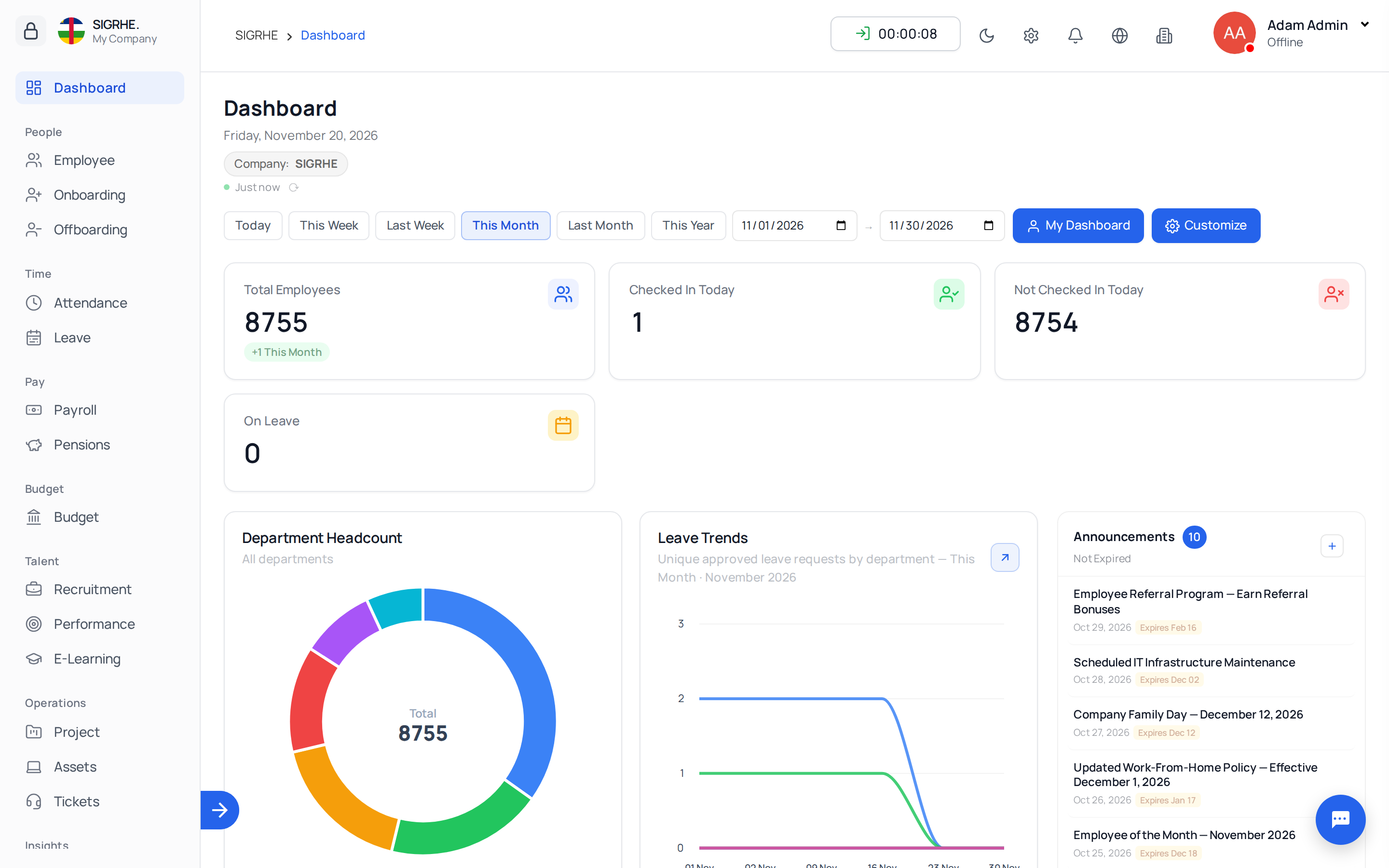
The dashboard interface consolidates real-time information from workforce records, attendance logging, leave approvals, onboarding pipelines, and offboarding workflows.
Key Metrics & Visual Analytics
- Headcount Metrics: Real-time counts of active employees segmented by department, job position, and employment type. Unassigned employees appear under Unassigned, helping administrators quickly locate and complete incomplete profiles.
- New Joiners: Summary cards displaying new employees who have joined recently or completed the onboarding portal.
- Document Expiries: Proactive alerts identifying employee documents approaching expiration (e.g., certifications, work permits, identifications).
- Pending Request Counters: Actionable counters displaying pending requests for:
- Shift requests and work type adjustments
- Attendance regularizations and overtime approvals
- Leave requests and leave allocation adjustments
- Resignation and exit process decisions
Module-Specific Dashboard Views
Each major HRMS module within NKL-HR provides tailored dashboard metrics:
1. Employee Dashboard
Provides high-level visibility into company demographics, active versus archived personnel, pending profile updates, and active disciplinary measures or suspensions.
2. Attendance Dashboard
Highlights real-time workforce availability:
- Employees currently checked in, on break, or absent
- Overtime records requiring administrative or managerial validation
- Late arrivals and early departures recorded for the day
- Unresolved monthly summary conflicts requiring reconciliation before payroll
3. Leave Dashboard
Visualizes time-off distribution across teams:
- Personnel currently on leave and scheduled upcoming absences
- Departmental leave trends and pending leave approvals
- Leave clash warnings indicating simultaneous absences within the same department
4. Onboarding Dashboard
Tracks hired candidates transitioning into the organization:
- Candidates distributed across onboarding stages (e.g., Initial, Document Collection, IT Setup)
- Real-time status of checklist tasks (Todo, Scheduled, Ongoing, Stuck, Done)
- Quick-filter links to immediately inspect and unblock stuck onboarding tasks
5. Offboarding Dashboard
Monitors active exit processes and leavers:
- Leavers categorized by stage and exit process
- Outstanding handover and full-and-final (FnF) settlement tasks
- Retained company assets or unresolved managerial responsibilities needing handover
Quick Navigation & Responsive Actions
Clicking any metric card, chart element, or pending counter on the dashboard automatically redirects to the relevant module list pre-filtered to the matching records, allowing rapid resolution of operational bottlenecks.